 Figure 2.
navigation / documentation overview / developer documentation
Recommendation: Read the user documentation, FAQ, and design documentation first. This page assumes familiarity with the jargon used in the Physics Derivation Graph.
This page provides developer guidance for the Physics Derivation Graph (PDG). Contributions to the project are welcome; see CONTRIBUTING.md on how to get started. The Physics Derivation Graph is covered by the Creative Commons Attribution 4.0 International License, so if you don't like a choice that was made you are welcome to fork the Physics Derivation Graph project.
Looking for the API? See API documentation.
Contents
The complexity supporting a technology is proportional to the number of abstraction layers required to enable it.
Python as a "glue" language is leveraged to connect existing tools like \(\rm\LaTeX\), Flask, logging, manipulation of data. Also, Python is the language the project owner is most comfortable with. And it is free and open source.
Python code in this project is formatted using Black.
Python libraries: matplotlib, black, mypy, pycallgraph, gunicorn, prospector, pandas, jsonschema, sympy, antlr4-python3-runtime, flask-wft, graphviz
The model-view-controller (MVC) is a way to separate presentation from the backend computation and data transformation.
Note on using MVC with Flask and WTForms: For webpages with forms, the form submission should return to controller.py rather than linking to next page.
Containerization provides documentation of software dependencies and shows the installation process, enabling reproducibility and platform independence.
Alpine was investigated as a candidate OS but was found to be insufficient. Ubuntu provides necessary packages.
Neo4j is used as a property graph database.
See the comparison of database options.
To provide a web interface, Flask is used. HTML (with Javascript) pages are rendered using Jinja2. Mathematical expressions rely on MathJax Javascript. Flask is not intended for production use in serving Python applications, so Gunicorn is the Web Server Gateway Interface. Nginx provides an HTTP proxy server.
Why this complexity is relevant is addressed in this StackOverflow answer.
Latex, dvipng, texlive
git, github
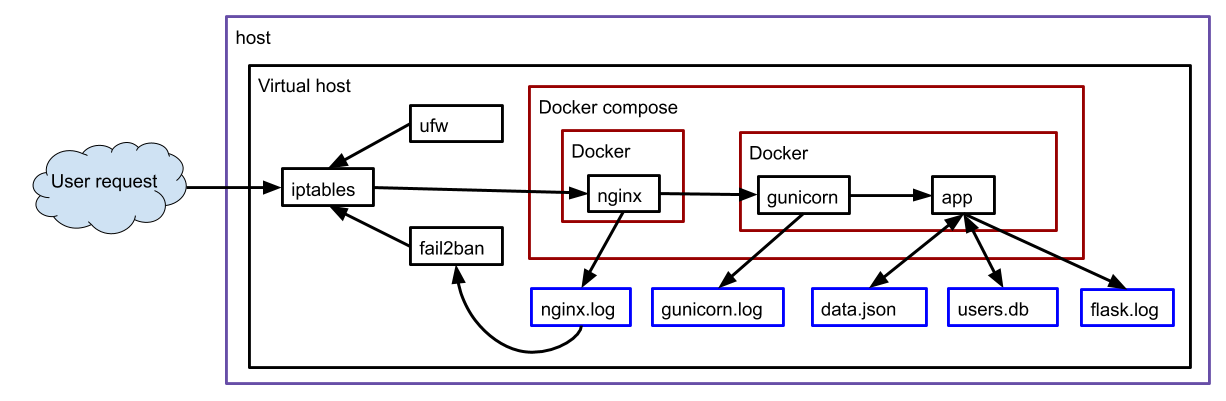
The following is an illustration of the various software interactions that are used in this website.
Figure 2.
git clone https://github.com/allofphysicsgraph/ui_v8_website_flask_neo4j.git
cd ui_v8_website_flask_neo4j/

make container_build
mkdir logs
cd certs
openssl genrsa > privkey.pem
openssl req -new -x509 -key privkey.pem -subj "/C=US/ST=WI/O=PDG/CN=Ben/emailAddress=ben.is.located@gmail.com" -out fullchain.pem
openssl dhparam -out dhparam.pem 2048
echo "UID=1000" >  /home/pdg/ui_v8_website_flask_neo4j/.env
echo "GID=1000" >> /home/pdg/ui_v8_website_flask_neo4j/.env
echo "GOOGLE_CLIENT_ID=AVERYLONGSTRINGFROMGOOGLE" >  /home/pdg/ui_v8_website_flask_neo4j/.env.google
echo "GOOGLE_CLIENT_SECRET=ANOTHERVERYLONGSTRING" >> /home/pdg/ui_v8_website_flask_neo4j/.env.google
echo "SECRET_KEY=ASECRETSTRINGFROMGOOGLEASDFASDF" >> /home/pdg/ui_v8_website_flask_neo4j/.env.google
make launch_webserver COMPOSE_FLAGS=--detach
To enter the container, run the commands
docker exec --workdir /scratch/ $(docker ps -qf "name=flask-webserver") /bin/bash
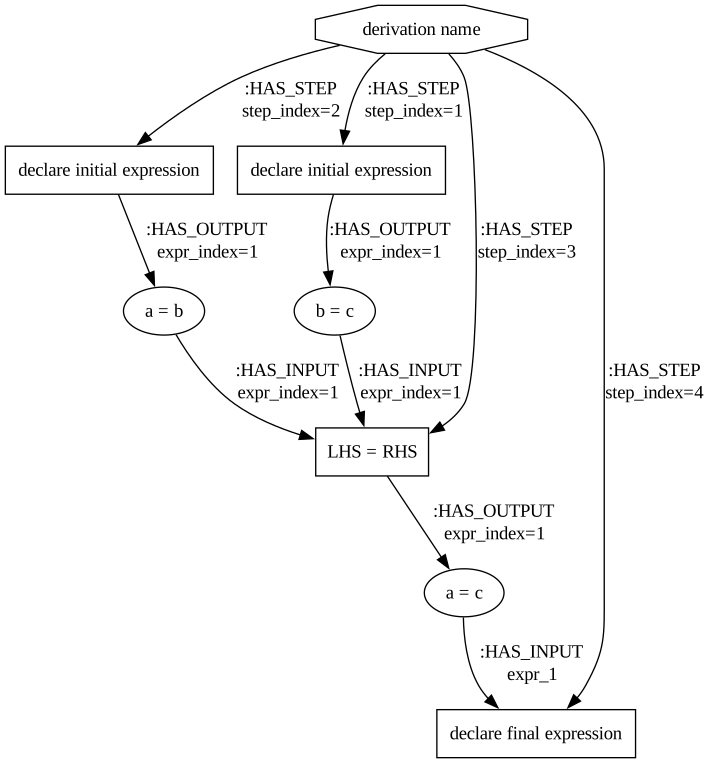
A simple graph for a derivation might be something like
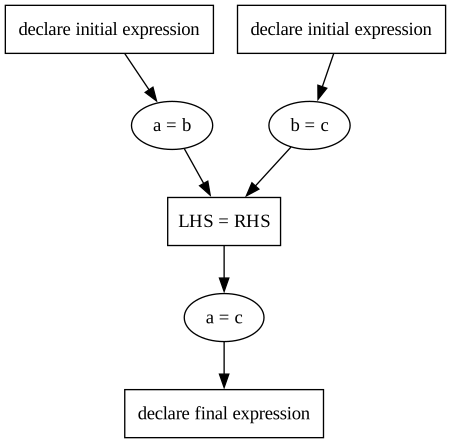
The purpose of step_index is to deterministically order expressions in the PDF and review-of-derivation page, and to allow users to manually adjust what the sequence is.
Each :HAS_INPUT and :HAS_OUTPUT and :HAS_FEED also has indices so the inference rule can explicitly refer to arguments.
| Create | Read | Update | Delete | |
|---|---|---|---|---|
| derivation |
|
|
|
|
| step |
|
|
|
|
| inference rule |
|
table of inference rules |
|
|
| expression |
|
|
|
|
| symbol |
|
|
|
|
| relation |
|
|
|
|
| operator |
|
|
|
|
| feed |
|
|
|
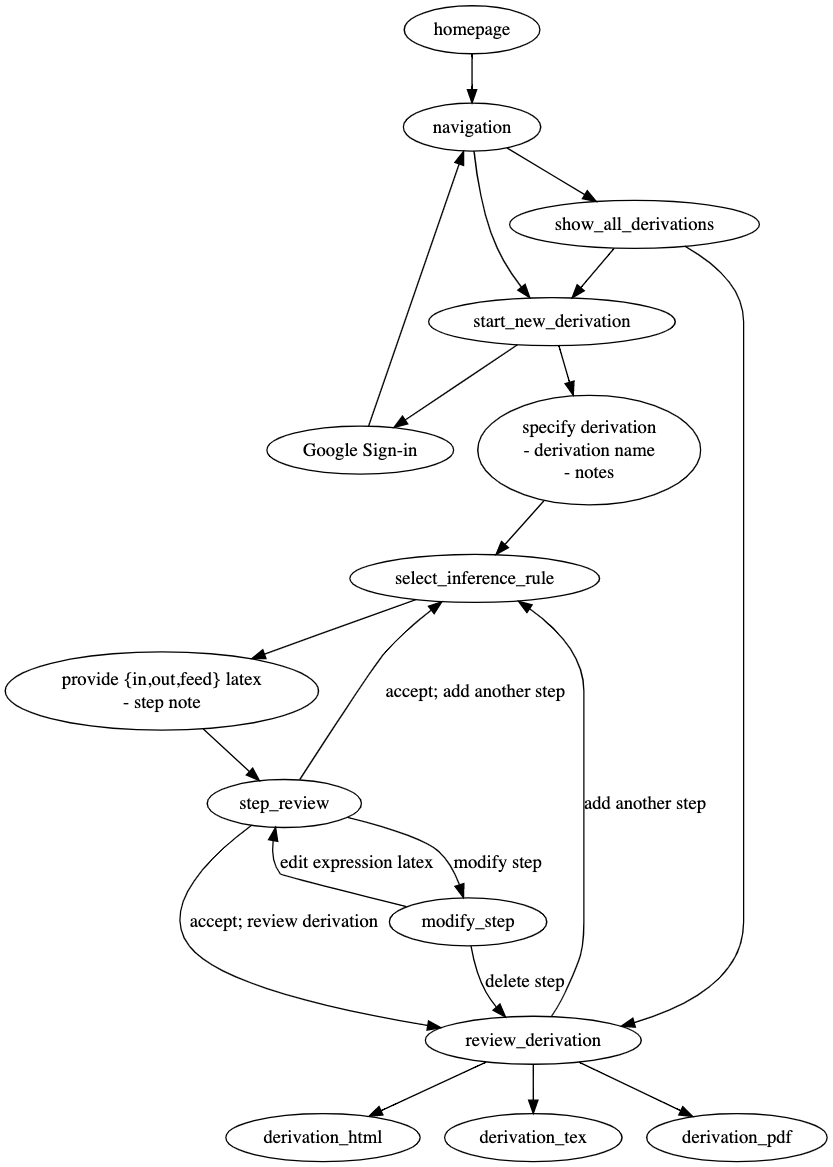
In addition to the CRUD webpages and API endpoint there pages that enforce data entry constraints like new_step_select_inference_rule/ID
After checking out the github repo, navigate to
ui_v8_website_flask_neo4j/flask and then run
make launch_webserver and then open Firefox to https://localhost.
The purpose of this section is to address the question, What happened when that docker container ran and the webpage was opened?
Understanding the answer relies on knowing Python, Flask, and the Model-View-Controller (MVC) paradigm.
The entry point for the program is pdg_app.py.
That file depends on scripts in library.
The purpose of library/neo4j_query.py is to manage access to the data that is in the Neo4j database.
All the additions, edits, and transformations to data are performed in library/neo4j_query.py and then provided to pdg_app.py for use in dynamically generating the HTML+Javascript pages using Jinja2.
The starting point of pdg_app.py is the line web_app = Flask(__name__, static_folder="static").
That is where the Flask app is started. Once the app is running, the web browser requests use function decorators like @web_app.route("/",...) to run corresponding functions like def to_index():.
Each of the decorated Python functions in pdg_app.py rely on functions defined in compute.py.
Many of the calls from pdg_app.py to library/*.py are wrapped in try/except clauses so that if the Python fails, the user is not exposed to the failure stack trace.
Each of the decorated Python functions in pdg_app.py terminate with either return render_template(... or return redirect(... which results in the user's web browser getting a new page of content.
When errors occur, there's a Flask function flash used to convey the error summary to the user (displayed at the bottom of the webpage).
The website allofphysics.com is run using docker-compose; see ui_v8_website_flask_neo4j/compose.yaml
When a web browser requests the page
https://allofphysics.com/developer_documentation
nginx calls gunicorn calls
pdg_app.py
with the URL string. The Python flask package uses the URL information to
call the relevant Python function. For example, requesting list_all_derivations
invokes the function def to_list_all_derivations():. That
Python function relies on functions in
neo4j_query.py
to get data from the Neo4j database.
This section tackles incremental construction of software used in the Physics Derivation Graph. There are a set of repositories (https://github.com/orgs/allofphysicsgraph/repositories?q=pdg_) that contain the relevant source code.
Those repos are to be worked through in sequence:
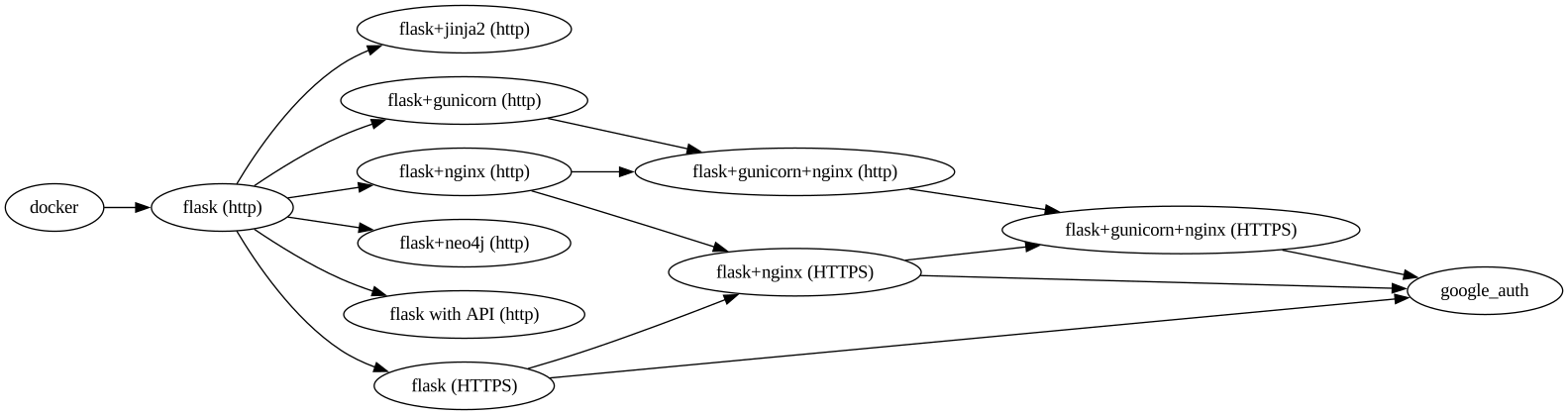
The constraints of the Physics Derivation Graph can be treated as a grammar. (This grammar should be equivalent to the schema of the Neo4j property graph.)
As an ANTLR grammar:
grammar PhysicsDerivationGraph_grammar;

derivation
   : step+
   ;

// "|" signifies is and/or condition.
// ":" comes after the LHS rule name
// The Antlr4 formatter is found at https://github.com/antlr/Antlr4Formatter
// prefer ':' to immediately proceed the first RHS rule
step
   : inference_rule expression+ feed*
   ;
inference_rule
   : 'add X to both sides'
   | 'multiply both sides by'
   | 'integrate both sides with respect to'
   | 'declareInitialExpression'
 ;

// example expression 'a = b'  -> symbolAST.variable = symbolAST.variable
// example expression 'a + 2 = b + 2' -> symbolAST.variable + symbolAST.constant.value.INT = symbolAST.variable + symbolAST.constant.value.INT

expression
   :
   //written as latex
   symbolAST
   ;

//example feeds  are 'c' 'x/2'
feed
   :
   //written as latex
   symbolAST
   ;


//The current version allows for the empty string, such as implicit multiplication of "a b = 4"
// As per the Diagram a symbol may be operator, constant, variable.
// There is no constraint to say that one of the 3 must exist so symbol AST could be empty
// Also it should be clear as to what combination can be valid for better parsing later on.
symbolAST
   : operator
   | constant
   | variable
   | variable EQUALS variable
   ;

EQUALS:
  '='
;

// INT, FLOAT, REAL, COMPLEX
value
   : FLOAT
   | INT
   ;

FLOAT
   : INT? ('.' INT)+
   ;

INT
   : '0'
   | [1-9] [0-9]+
   ;
// Letters of the alphabet are often used as variables with different kinds of context.
// Need to capture that context in some way.
// In Set Theory there are a common set of single characters that have a common meaning.
// In Calculus a different set of common variable, single letter symbols but different from set theory.
// in sympy.Symbol('a',integer=True,even=True) for example
variable
   : 'a'
   | 'b'
   | 'c'
   | 'x'
   | dimensionality
   ;
   //becuase integrals are complex I would write it as it's own non-terminal

operator
   : '+'
   | '-'
   | '\\int'
   ;

constant
   : value unit
   ;

// see https://en.wikipedia.org/wiki/Dimensional_analysis
// write these entries as a non-terminal as there are likely several complex cases with several or conditions to consider.
dimensionality
   : time
   | length
   | luminous_intensity
   | mass
   | amount_of_substance
   | electric_current
   | absolute_temperature
   ;

// to be defined
time
   : 'time'
   ;

// to be defined
length
   : 'length'
   ;
   // to be defined
luminous_intensity
   : 'luminous_intensite'
   ;
   // to be defined
mass
   : 'mass'
   ;
   // to be defined
amount_of_substance
   : 'amount_of_substance'
   ;
   // to be defined
electric_current
   : 'electric_current'
   ;
   // to be defined
absolute_temperature
   : 'absolute_temperature'
   ;
   // Likely non-terminals depending on the complexity of the OR conditions.

unit
   : 'meter'
   | 'foot'
   | 'second'
   | 'hour'
   | 'Watt'
   | 'Joule'
   | 'inch'
   ;

WS: [ \t] -> skip;
NEWLINE: '\n' -> skip;
clean up docker images using
docker images | grep "" | tr -s " " | cut -d' ' -f3 | xargs docker rmi
on a Mac the files get stored in a QEMU image,
$ ls -hal /Users/bhp/Library/Containers/com.docker.docker/Data/vms/0/data/
For an overview of where disk space is being used,
$ docker system df
TYPE                TOTAL               ACTIVE              SIZE                RECLAIMABLE
Images              45                  17                  34GB                21.62GB (63%)
Containers          621                 0                   8.129GB             8.129GB (100%)
Local Volumes       5                   3                   251.1kB             20.79kB (8%)
Build Cache         0                   0                   0B                  0B
For an explanation of RECLAIMABLE, see https://stackoverflow.com/a/51520627/1164295
Actions per role: