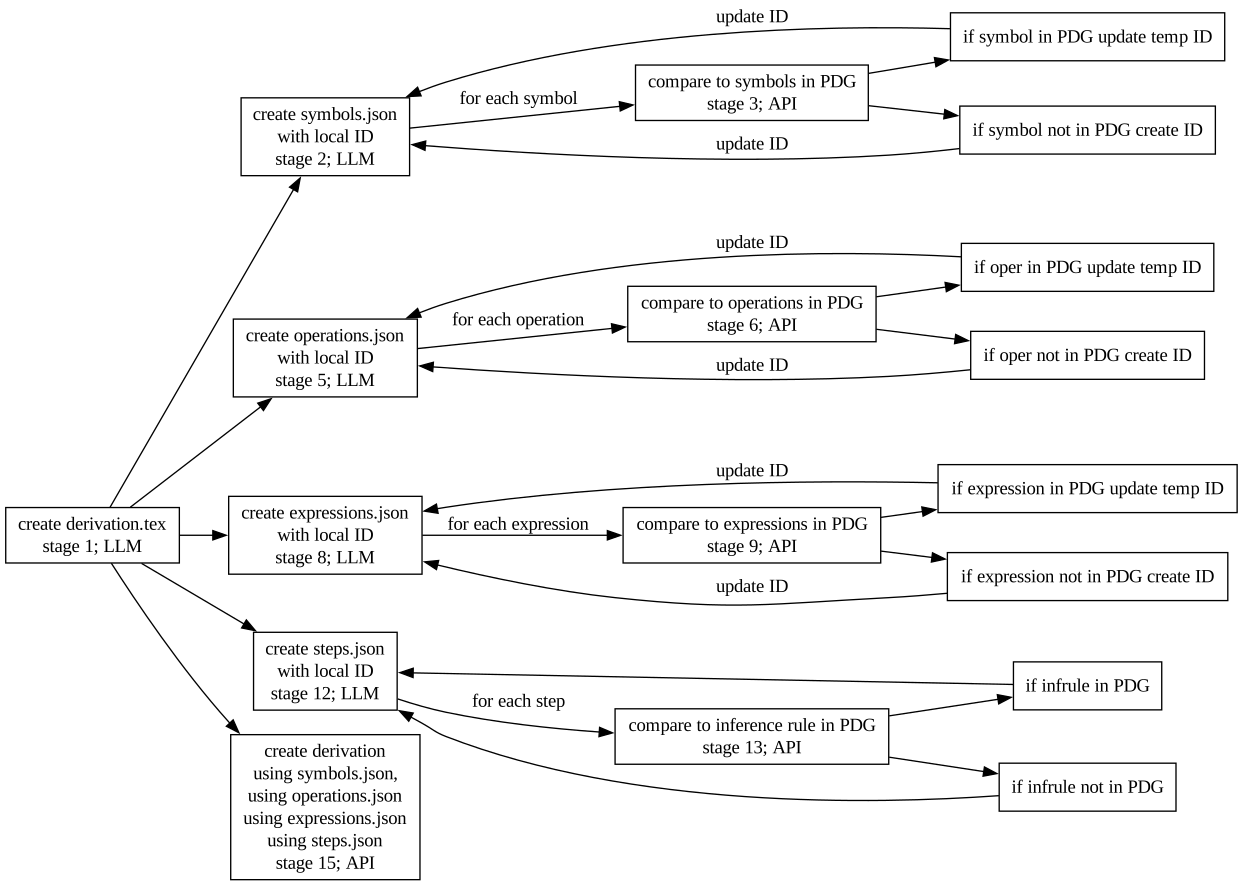
The Physics Derivation Graph does not have a local LLM nor does the project call remotely-hosted LLMs. Use of an LLM or agentic LLM is the responsibility of the user and is to be run client-side. The Physics Derivation Graph provides API documentation relevant to agents.
The workflow for a generic derivation is
The order of the stages is due to the constraint that SYMBOLS.json and OPERATIONS.json have to be determined before EXPRESSIONS.json, and EXPRESSIONS.json has to be determined before STEPS.json.
Stage 1: Create DERIVATION.tex using this prompt.
Stage 2: Create SYMBOLS.json using this prompt.
Stage 3: Use validate SYMBOLS.json to create SYMBOLS_with_local_IDs.json.
Stage 4: Extract the current symbols from the PDG database using
curl --silent --insecure https://localhost/api/resources/symbol/scalars |\
 jq 'walk(if type == "object" then del(._links, ._templates, .count, .author_name_latex, .created_datetime) else . end)' > pdg_scalars.json

curl --silent --insecure https://localhost/api/resources/symbol/vectors |\
 jq 'walk(if type == "object" then del(._links, ._templates, .count, .author_name_latex, .created_datetime) else . end)' > pdg_vectors.json

curl --silent --insecure https://localhost/api/resources/symbol/matrices |\
 jq 'walk(if type == "object" then del(._links, ._templates, .count, .author_name_latex, .created_datetime) else . end)' > pdg_matrices.json
Stage 5: Create matched_SYMBOLS.json and missing_SYMBOLS.json using
this prompt.
Stage 6: Given SYMBOLS_with_local_IDs.json and SYMBOLS_matched.json from the LLM, use
this page to create SYMBOLS_with_local_IDs_and_PDG_IDs.json.
Stage 7: Given SYMBOLS_with_local_IDs.json and SYMBOLS_missing.json, a human reviewer should confirm lack of existence. Once the human reviewer confirms then creation of symbols should be mechanical.
See list of scalars and
list of vectors
list of matrices
TODO: Create the API and, separately, a web page that takes in the missing JSON list to create symbols in PDG.
Once the missing symbols have been created in PDG database, rerun the assessment (from Step 4) and confirm symbols until missing is empty.
Stage 8: Create OPERATIONS.json
using this prompt.
Stage 9: validate OPERATIONS.json to create OPERATIONS_with_local_IDs.json
Stage 10: Extract operations from PDG using
curl --silent --insecure https://localhost/api/resources/symbol/operations |\
 jq 'walk(if type == "object" then del(._links, ._templates, .count, .author_name_latex, .created_datetime) else . end)' > pdg_operations.json
Stage 11: Create OPERATIONS_matched.json and OPERATIONS_missing.json using this prompt.
Stage 12: Given OPERATIONS_with_local_IDs.json and OPERATIONS_matched.json use this page to create OPERATIONS_with_local_IDs_and_PDG_IDs.json
Stage 13: Given OPERATIONS_with_local_IDs.json and OPERATIONS_missing.json
See list of operations and
Once the missing operations have been created in PDG database, rerun the assessment (from Step 10) and confirm operations until missing is empty.
Stage 14: Create EXPRESSIONS.json using this prompt.
Stage 15: validate EXPRESSIONS.json to create EXPRESSIONS_with_local_IDs.json
Stage 16: Get the current expressions from PDG database as JSON using
curl --silent --insecure https://localhost/api/resources/expressions |\
 jq 'walk(if type == "object" then del(._links, ._templates, .count, .author_name_latex, .created_datetime) else . end)' > pdg_expressions.json
TODO: Rather than compare the expressions in a derivation to every expression in the PDG database, only compare expressions that have corresponding symbols and operations
Stage 17: compare EXPRESSIONS_with_local_IDs.json to pdg_expressions.json using
this prompt; creates EXPRESSIONS_matches.json and EXPRESSIONS_missing.json
Stage 18: Merge EXPRESSIONS_with_local_IDs.json with EXPRESSIONS_matches.json using this page to get EXPRESSIONS_with_local_IDs_and_PDG_IDs.json
Stage 19: Add expressions in EXPRESSIONS_missing.json to PDG using web or API.
list of expressions
Stage 20: (Mechanical): Extract RELATIONS.json from EXPRESSIONS_with_local_IDs_and_PDG_IDs.json since "relation" is one of the keys and "=" is typical.
Stage 21: compare "=" and other relations with
curl --silent --insecure https://localhost/api/resources/symbol/relations |\
 jq 'walk(if type == "object" then del(._links, ._templates, .count, .author_name_latex, .created_datetime) else . end)' > pdg_relations.json
Once all symbols and operations in relations exist in the database, and those database IDs have been updated in the respective JSONs, then the LLM can figure out what symbols, operations, and relations are associated with each expression. The LLM will produce a new JSON file with all the respective edges. Will need a new JSON schema for the edge list to validate against.
Stage ??: create EXPRESSIONS_with_SYMBOLS_and_OPERATIONS.json from EXPRESSIONS.json + DERIVATION.tex + SYMBOLS_with_local_IDs.json + OPERATIONS_with_local_IDs.json + RELATIONS.json
Stage ??: to create STEPS.json see prompt and then validate STEPS.json
TODO: what happens if a new inference rule is needed?
TODO: create STEPS_with_EXPRESSIONS.json from DERIVATION.tex + STEPS.json + EXPRESSIONS.json
Stage ??: to create DERIVATION.json see validate DERIVATION.json
DERIVATION.json is